Printing the Paradise Leaflet:
We have had a number of requests for printable original electronic copies of the Paradise leaflet, and understand it has been translated into languages as diverse as Arabic, Fijian, Polish, and Finnish. If you translate it, please let us know, especially if we can point others to your web site, or host your translation here! (We understand that in some cases this is not advisable.)
The following information is designed to help you choose the best option for your printing needs. If you are not sure what to do, print this page out — http://Paradise.PaulANorman.com and download and copy the main two files (marked with **) and put on Cdrom/Dvd/Memory Stick and take it all to a photocopy shop or reasonably priced print shop.
Here we use A4 and A3 paper, those are ISO sizes:
A4 210mm x 297mm,
A3 297mm x 420mm, (NOT equivalent to American Letter or Legal sizes).
We write in New Zealand (UK / Euro) English.
Download: UK English versions
American USA spelling and half-Letter (Statement), and booklet on Letter size and Tabloid.
Download: USA Amercian versions
The whole project is divided into two parts. The First Option can produce the same result, but starts out as an A5 PDF, just "one page after the other" (which can be sensibly read on screen), a format that some photocopy shops prefer to use to make folding A4 booklets. The Second Option is a 28 page A5 booklet printed 2-up on double sided A3 sheets, as a folded booklet layout.
What ever options you use, what you should end up with is a folded 28 page A5 fronted booklet, that can be stapled along it's spine when folded down from A4.
Then there are three Other Options (A5 and A6) and CMYK Colour Gamut (mostly used by commercial printers)
About the download files format (PDF)
In both options the booklet is presented in acrobat reader's Pdf format "print ready".
If your computer does not know what to do with these files once you have downloaded them, go to Adobe.com and download the FREE Acrobat Reader programme.

In the second Pdf, the booklet will not always read properly on screen, and must be printed double sided, and folded first.
To read this booklet in web format (MS Internet Explorer 6+) on screen, please view here: Paradise for Free!
If you are printing it yourself on a computer printer, remember to keep the heads (tops) of the pages at the same place, tumbling them sideways when you put the second side back in to print. This will make the pages readable right way up on both sides of the paper.
Right click any of the links below and "Save to Disk".
We offer two main sizes of finished booklet here, please choose from links below — A5 when folded
(148mm x 210mm)
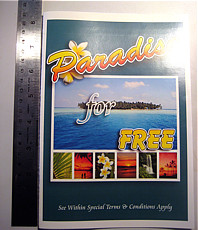
A6 front face when folded
(A6, 105mm x 148mm, fits inside a tall DVD case.)
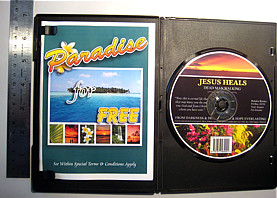
Option One - Single Sided A5
- Readable on Screen(This single page continuous format, is preferred by some Copy Centres and Print Shops)
Only page one is in colour.
Pages 2 to 28 are black and white only (cheaper printing). Tell your printer driver to make a booklet on to A4 Landscape
A5 when folded
(148mm x 210mm)
**
A5 (148mm x 210mm) Paradise3 RGB Colour Cover BW Text the rest file size: 19M
 from 2008 RGB 1up A5 as straight on A5 pdf.jpg "A5 (148mm x 210mm) Paradise3 RGB Colour Cover BW Text the rest")
Option Two
- Double Sided A3(Cuts and folds to 2-up A5 face booklets. This Can Be Printed from an A3 Computer Printer at Home, Church or Wherever . .)
Only side one of sheet one is in colour (that is pages 1 and 28 of the folded finished A5 booklet format).
Pages 2 and 27 (side two of the first A3 sheet one) is black and white only, but may need to be printed at the same time as the other side of this sheet, which as explained above is in colour.
Just print this double sided it is already formatted as a booklet.
A5 when folded
(148mm x 210mm)
**
 from 2008 RGB 2up A5 booklets on A3 pdf.jpg "A3 Sheets Paradise05 RGB Colour Cover BW Text the rest")
A3 Sheets Paradise05 RGB Colour Cover BW Text the rest file size: 19M
Other Options and Sizes
(Already formatted as RGB booklets — just print double sided)
A5 when folded
(148mm x 210mm)
%20from%202008%20RGB%201up%20A5%20booklet%20on%20A4 pdf.jpg "1up A5 booklet signatures on A4")
1up A5 booklet signatures on A4 (RGB)A6 front face when folded
(A6, 105mm x 148mm, fits inside a tall DVD case.)
%20from%202008%20RGB%202up%20A6%20booklet%20on%20A4 pdf.jpg "2up A6 booklet signatures on A4")
2up A6 booklet signatures on A4 (RGB)%20from%202008%20RGB%204up%20A6%20booklet%20on%20A3 pdf.jpg "4up A6 booklet signatures on A3")
4up A6 booklet signatures on A3 (RGB)
CMYK Colour Gamut
Mostly used by commercial printers and larger Copy Shops.
When printed they will look like the pictures above here.
A5 when folded
(148mm x 210mm)
CMYK 1up A5 as straight on A5  from 2008 CMYK 1up A5 as straight on A5 pdf.jpg "CMYK 1up A5 as straight on A5")
 from 2008 CMYK 1up A5 booklet on A4 pdf.jpg "CMYK 1up A5 booklet on A4")
CMYK 1up A5 booklet on A4 from 2008 CMYK 2up A5 booklets on A3 pdf.jpg "CMYK 2up A5 booklets on A3")
CMYK 2up A5 booklets on A3A6 front face when folded
(A6, 105mm x 148mm, fits inside a tall DVD case.)
 from 2008 CMYK 2up A6 booklet on A4 pdf.jpg "CMYK 2up A6 booklet on A4")
CMYK 2up A6 booklet on A4 from 2008 CMYK 4up A6 booklet on A3 pdf.jpg "CMYK 4up A6 booklet on A3")
CMYK 4up A6 booklet on A3
American USA spelling: half-Letter, booklet on Letter size, and two booklets on Tabloid.
USA — RGB Color Gamut
These might be printable at home or in the office.
half-Letter (statement) when folded
(5.5 in x 8.5in)
RGB half-Letter printed on half-Letter paper size  USA from 2008 RGB 1up Statement.pdf.jpg "RGB half-Letter")
You could try telling your printer to make a booklet onto Letter Paper (Landscape orientation). USA from 2008 RGB 1up Statement booklet on Letter.pdf.jpg "CMYK 1up USA half-Letter booklet on USA Letter")
RGB half-Letter full booklet printed on Letter paper size
Print on Letter paper (Landscape orientation), double sided (already formatted as a booklet — if necessary, experiment to get double siding correct). USA from 2008 RGB 2up Statement booklets on Tabloid.pdf.jpg "CMYK 2up USA half-Letter booklets on USA Tabloid")
RGB half-Letter full booklets printed 2-up on Tabloid paper size
Print on Tabloid paper (Portrait orientation), double sided (already formatted as a booklet — if necessary, experiment to get double siding correct).
American USA spelling: half-Letter, booklet on Letter size, and two booklets on Tabloid.
USA - CMYK Color Gamut
Mostly used by commercial printers and larger Copy Shops.
When printed they will look like the pictures above here.
half-Letter (statement) when folded
(5.5 in x 8.5in)
CMYK half-Letter printed on half-Letter paper size  USA from 2008 CMYK 1up Statement.pdf.jpg "CMYK half-Letter")
You could try telling your printer to make a booklet onto Letter Paper (Landscape orientation). USA from 2008 CMYK 1up Statement booklet on Letter.pdf.jpg "CMYK 1up USA half-Letter booklet on USA Letter")
CMYK half-Letter full booklet printed on Letter paper size
Print on Letter paper (Landscape orientation), double sided (already formatted as a booklet — if necessary, experiment to get double siding correct). USA from 2008 CMYK 2up Statement booklets on Tabloid.pdf.jpg "CMYK 2up USA half-Letter booklets on USA Tabloid")
CMYK half-Letter full booklets printed 2-up on Tabloid paper size
Print on Tabloid paper (Portrait orientation), double sided (already formatted as a booklet — if necessary, experiment to get double siding correct).
Main Print Ready Page
Main Web Page
P.O. Box 1005
Nelson 7040
New Zealand
Worldwide Phone +64 21 782 433, Fax +64 21 291 2433.
From inside New Zealand: Phone 021 782 433, Fax 021 291 2433.
email: paul@paulanorman.com
| Skype: | Skype Name: | Click to Talk: (Even if we're “offline”) |
|---|---|---|
| Paul | PaulANorman | |
| Michael | Michael.F.Too | |
Home Page: PaulANorman.com